Call transfers are one of the most routine actions in any contact center or business phone environment — and one of the most frequently handled poorly. The two main approaches are fundamentally different: a warm transfer involves a consultation before the handoff; a cold transfer sends the caller directly without one.
The right choice depends on the call type, the context available, and what the next agent actually needs to serve the customer well.
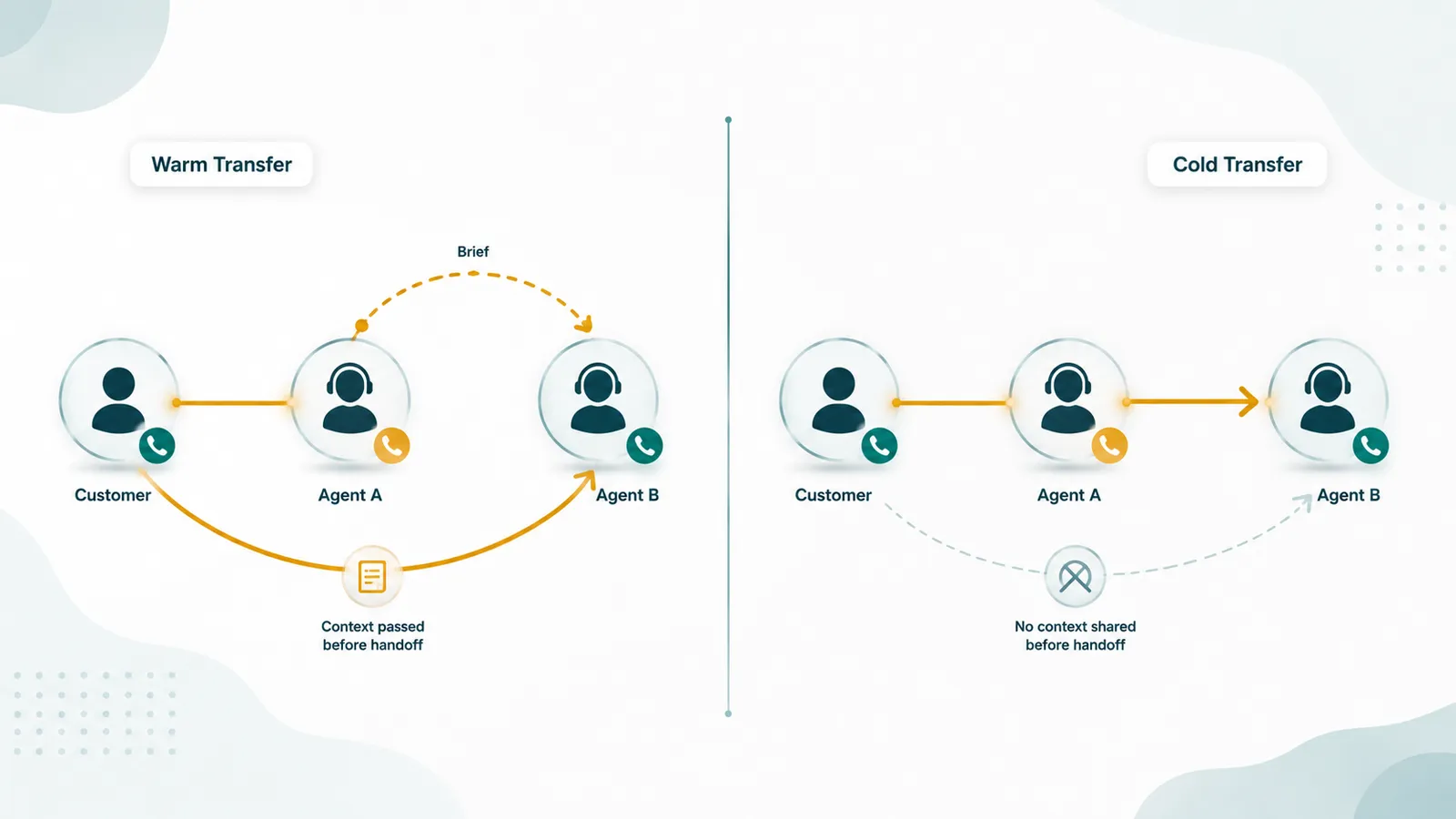
Key distinction: A warm transfer (also called an attended transfer) connects the transferring agent to the receiving agent before the customer is handed over — the transferring agent briefs the recipient, then completes the handoff. A cold transfer (also called a blind transfer) sends the caller directly to the destination without any prior consultation. Warm transfers cost more time upfront; cold transfers risk making the customer repeat themselves.
What Is a Warm Transfer?
A warm transfer unfolds in three steps:
- The transferring agent puts the customer on hold and calls (or conferences in) the receiving agent or queue before the customer is moved. The customer hears hold music or a hold message while this consultation happens — they are not involved.
- The transferring agent briefs the receiving agent: who the customer is, what the issue is, what has already been tried, what context the receiving agent needs to handle the call without asking the customer to repeat themselves.
- The transferring agent completes the transfer — connecting the customer directly to the receiving agent — and drops off the call. The receiving agent already has the caller's name, issue, and what has been tried, so the conversation continues without the customer repeating themselves.
The consultation step is the defining characteristic of a warm transfer. It protects the customer from repeating their story and gives the receiving agent what they need to help immediately.
What Is a Cold Transfer?
A cold transfer (sometimes called a blind transfer) routes the caller directly to the destination — an extension, a queue, or an external number — without the transferring agent speaking to the recipient first. The transferring agent initiates the transfer and drops off the call. The receiving agent picks up knowing only what they can see from caller ID or a basic CRM screen pop — nothing the caller has already explained.
The customer's experience: they are mid-conversation, their issue is partially explained, and then suddenly they hear hold music and eventually a new person who says "How can I help you?" — prompting the customer to start over. If the receiving agent doesn't even know who transferred the call or why, the opening exchange is awkward. Note that hold — used while the agent checks something before returning to the same caller — is different from a transfer. For the distinction between hold and call park, which lets any available agent retrieve the call from a shared orbit, see our dedicated comparison.
Comparison at a Glance
| Factor | Warm Transfer | Cold Transfer |
|---|---|---|
| Consultation before handoff | Yes | No |
| Customer repeats themselves | Rarely — context passed in brief | Often — receiving agent has no context |
| Transferring agent time | Higher — must brief recipient | Lower — one-click handoff |
| Customer hold time | Longer — includes consultation | Shorter — immediate redirect |
| Customer experience | Smoother — no re-explaining | More friction — often frustrating |
| Receiving agent confidence | High — briefed before taking call | Low — no prior context |
| Best for | Complex issues, specialist handoffs, sales escalations | Simple routing, internal transfers to known queues |
When to Use a Warm Transfer
Use a warm transfer when context genuinely changes how the receiving agent will handle the call:
- Escalations to a specialist or manager. The specialist needs to know what the customer has already explained, what was tried, and why the escalation is happening — before taking the call.
- Sales hand-offs. When a sales development representative (SDR) qualifies a prospect and hands them off to a closing rep, a warm transfer preserves the rapport built and gives the closing rep context on the prospect's interests, objections, and timeline.
- Complex support tickets. When a customer has explained a multi-step problem to the first agent, that explanation shouldn't disappear when the call transfers. A warm brief preserves it.
- Sensitive or emotional situations. Customers who are upset, anxious, or dealing with a difficult situation benefit from a receiving agent who already has some awareness — they don't have to re-explain why they're distressed.
- VIP or high-value accounts. Where the relationship value justifies the extra agent time.
When a Cold Transfer Is Appropriate
Cold transfers are appropriate when context doesn't need to travel with the call or when the transfer destination has full information already:
- Queue transfers with CRM screen pops. If the receiving queue has a full CRM record that pops the customer's account information when the call arrives, the agent already has the context. A warm consultation adds time without adding value.
- Simple routing mismatches. A caller who got to the wrong department and needs to go to the right one. If there's no real interaction yet, there's nothing to brief the recipient on — send them directly.
- Internal transfers between extensions. Colleagues transferring calls between themselves in a small office where context is easily established or already understood.
- High-volume contact centers with standardized call types. When most calls follow a predictable pattern and the receiving agent's job is to handle that pattern, a CRM screen pop provides more useful context than a verbal brief.
Common Mistakes
Using cold transfers for complex issues to save agent time
The time saved by the transferring agent is paid for by the customer and the receiving agent. The customer spends time re-explaining; the receiving agent spends time reconstructing context that was already established. The total time spent increases; only the metric for the transferring agent improves. This is particularly damaging in escalation scenarios where the customer is already frustrated.
Warm transfers that turn into three-way calls
If the consultation runs long — or if the transferring agent stays on the call after the handoff — what was intended as a warm transfer becomes an extended three-way call. Brief the recipient in 30–45 seconds, complete the transfer, and drop off. Staying on creates confusion about who owns the conversation.
Not informing the customer
In both warm and cold scenarios, customers should be told the transfer is happening before it happens. "I'm going to connect you with our billing team, who can resolve this — one moment" is more professional than sudden hold music. The warm transfer brief should happen with the customer on hold, not with the customer listening to the briefing.
Transferring to an unavailable agent or full queue
A cold transfer to a ringing extension that nobody answers — resulting in the customer hitting voicemail — is one of the worst call experiences from a service perspective. Before cold-transferring, confirm the destination is staffed. Warm transfers automatically solve this: if the receiving agent doesn't pick up the consultation call, the transferring agent can handle it differently before putting the customer through.
Whisper: A Middle Option
Some cloud phone systems offer a whisper feature: as the transfer connects, the receiving agent hears a brief automated or agent-recorded announcement that the transferring agent has left — with key context summarized — before the customer's audio connects. The customer doesn't hear the whisper. This provides a lightweight form of context without requiring a full warm consultation and without adding customer hold time. Whisper is useful in high-volume environments where full warm transfers would significantly impact throughput.
Impact on Customer Satisfaction
Transfers are a moment of friction by nature. Customers who must re-explain their situation after a transfer consistently report lower satisfaction than customers whose call is handled in a single interaction. Repeated transfers — being bounced between three or four destinations before finding the right person — are among the most cited frustrations in customer service research.
Reducing unnecessary transfers in the first place — through better IVR design, better routing, and better agent training on what they can handle — is more impactful than perfecting transfer technique. When transfers are necessary, warm transfers reduce the friction cost significantly. See our articles on call routing and call queues for how routing architecture reduces the need for transfers in the first place.
How Cloud Phone Systems Implement Warm Transfers
In a cloud phone system, the mechanics of a warm transfer use SIP signaling to place the original caller on hold, establish a consultation call to the receiving agent, and then bridge the two legs together when the transfer is confirmed. The exact UI flow varies by platform, but the underlying SIP behavior is consistent: the transferring agent's endpoint sends a re-INVITE to place the customer on hold, initiates a new INVITE to the receiving agent, and completes the transfer with a REFER message once the consultation is done.
From a platform evaluation standpoint, the features that matter for transfer quality:
- Transfer to a queue vs. to a specific agent. Some systems let you warm transfer directly to another agent; others only support transferring to a queue or ring group. Direct agent warm transfer requires the platform to support attended transfer with an extension-to-extension consultation path — not all cloud platforms do this from the softphone or mobile app.
- Screen pop at the receiving agent. A warm transfer that also passes a CRM screen pop — so the receiving agent sees the customer record the moment the call connects — eliminates the need for any verbal briefing about who is calling. Some platforms pass caller ANI and metadata automatically; others require manual CRM integration to trigger the pop.
- Whisper injection. Platforms with whisper capability can play a brief audio announcement to the receiving agent (agent name, queue source, reason for transfer) as the call connects, before the customer hears anything. This is the lightest-weight warm transfer variant — it adds context without requiring a consultation call.
- Transfer status visibility. Supervisors monitoring a live transfer should be able to see the transfer in progress. Platforms with a real-time wallboard or supervisor view show transfers as a distinct state, separate from hold or active call, so supervisors can intervene if the consultation stalls.
AI and Automated Warm Transfers
AI voice agents introduce a new warm transfer variant that is becoming standard in contact center deployments. When an AI voice agent handles the initial call — qualifying the caller, collecting account information, understanding the issue — and then determines a human is needed, it can execute a warm transfer that includes structured context rather than a verbal brief.
The context package an AI agent passes to the human agent at transfer includes: the caller's name and account identifier (looked up in real time via CRM API), a summary of what the caller said and what was attempted in the AI conversation, and a recommended action. The receiving human agent sees this summary in their interface before the customer's audio connects — no verbal brief from the AI is needed because the structured handoff replaces it.
This is meaningfully better than a human warm transfer in one respect: the context is structured and complete, not dependent on the transferring agent's ability to summarize quickly under load. It is worse in one respect: the AI cannot make judgment calls about what context the receiving agent most needs — it passes a fixed data structure regardless of case complexity. For designing effective AI-to-human handoffs, see our guide on AI voice agent handoff design.
EaseDial
Warm transfers, listen, whisper, and barge — full supervisor and agent call tools in one platform.
Frequently Asked Questions
How EaseDial handles call transfers: Blind, warm, and assisted transfer options built into the agent interface — with supervisor tools to monitor and assist during live transfers. Call transfer feature →